How to Check Bill of Entry Status Online on ICEGATE Portal
In India, importers must comply with various customs procedures before their goods can be cleared. One of the most important documents in this process is the Bill of Entry (BOE). After filing a BOE, importers often ask: How do I check my Bill of Entry status online?
The ICEGATE portal (Indian Customs Electronic Gateway) provides a quick and easy way to track your BOE status. In this guide, we’ll explain the meaning of Bill of Entry, what changed under ICEGATE 2.0, the step-by-step process to check your BOE status online, and about common problems and how to fix them.
TL;DR — How to check Bill of Entry status on ICEGATE (2026)
- Log in to icegate.gov.in with your registered ICEGATE credentials.
- From the Dashboard, open the Services panel.
- Click Enquiries → ICEGATE Enquiry Service.
- Select Document Status.
- Choose Bill of Entry.
- Enter your Location (port code), Bill of Entry Number and Bill of Entry Date, then hit Search.
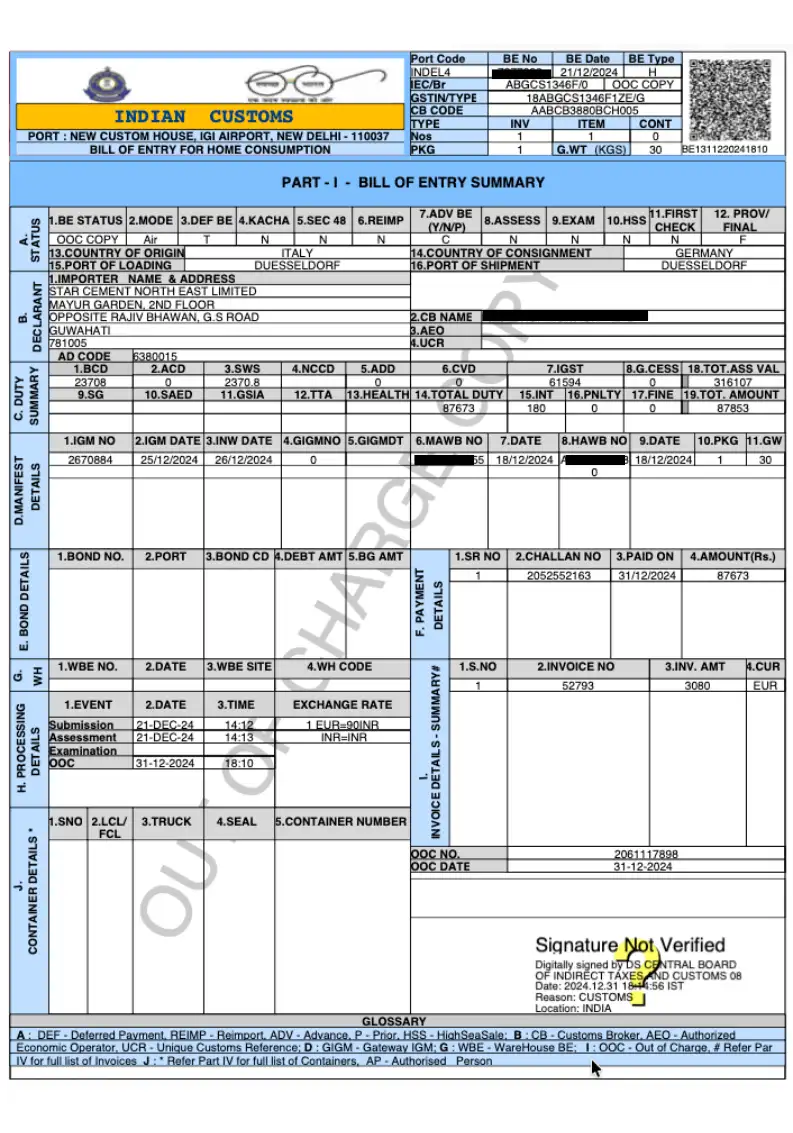
The finish line is the OOC (Out of Charge) date. Until that field is populated, your goods are not released, whatever else the screen says.
Bill of Entry status: the quick answers
How can I check the status of my Bill of Entry online?
Log in at icegate.gov.in, then go to Services, Enquiries, ICEGATE Enquiry Service, Document Status, Bill of Entry. Enter your port code, BOE number and BOE date. Since ICEGATE 2.0 there is no guest route to clearance status, and the public tracking page no longer returns it.
How to check BOE online?
You need three things before you start: the customs station code (INNSA1, INMAA1, INMUN1 and so on), the seven-digit Bill of Entry number, and the filing date. All three must match the filing exactly. A wrong port code is the single most common reason the search comes back empty.
How can I verify my Bill of Entry status on ICEGATE?
Open the Current Status tab and look for the OOC, or Out of Charge, date. That field, and only that field, confirms customs has released the goods. Appraisal, assessment, payment and examination dates all populate earlier, and none of them mean your cargo can move.
What is BOE status?
It is not a single word. ICEGATE returns a row of date fields: appraisal, assessment, payment, examination and Out of Charge. Read them left to right. The last populated date is where your shipment is, and the next empty one is what is blocking it.
What is a Bill of Entry (BOE)?
The Bill of Entry is a legal document filed by importers (or their Customs House Agent) with the Indian Customs department when goods arrive in the country. It serves as a declaration about the goods being imported, including details like:
- Importer’s name and IEC (Importer Exporter Code)
- Goods description and HS code
- Quantity and value of goods
- Customs duties and taxes payable
- Country of origin and shipment details
In simple terms, BOE is proof that goods are being imported legally into India.
What changed - and why other guides send you to a dead end
If you searched this six months ago, you were told to open ICEGATE, skip the login, and use a public enquiry or tracking page. That worked for years. It doesn't now.
Bill of Entry status was removed from the public tracking section and folded into the logged-in ICEGATE Enquiry Service under ICEGATE 2.0. Three consequences worth knowing before you waste twenty minutes:
- You need an account. There's no guest route to BOE clearance status any more. If you don't have credentials, start with our guide to ICEGATE registration and login - Simplified registration is enough to view status; you only need Full registration with a DSC to file.
- Old bookmarks fail. The page didn't break, it moved. An error on a saved link is expected, not a portal outage.
- Two lookalike routes will mislead you. The GST portal's "Search BOE" returns records for input tax credit reconciliation, not clearance status. And "Status of BE in RBI-IDPMS" on ICEGATE tells you whether your BOE has been matched against your foreign remittance, a banking check, not a customs one. Neither shows you where your cargo actually is.
How to check your Bill of Entry status — step by step
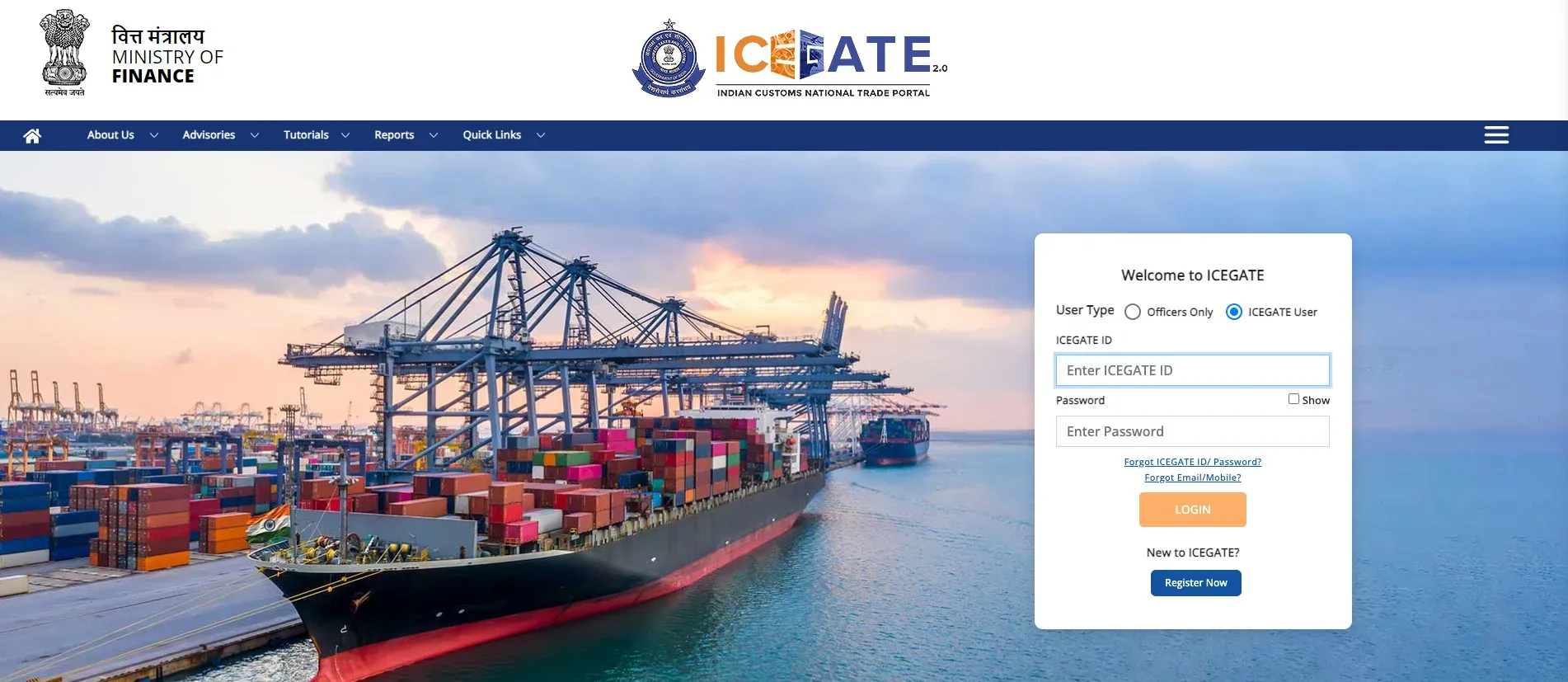
Step 1 — Log in and open the Services panel
Sign in at icegate.gov.in with your registered credentials. You'll land on your Dashboard. Find the Services card and expand it.
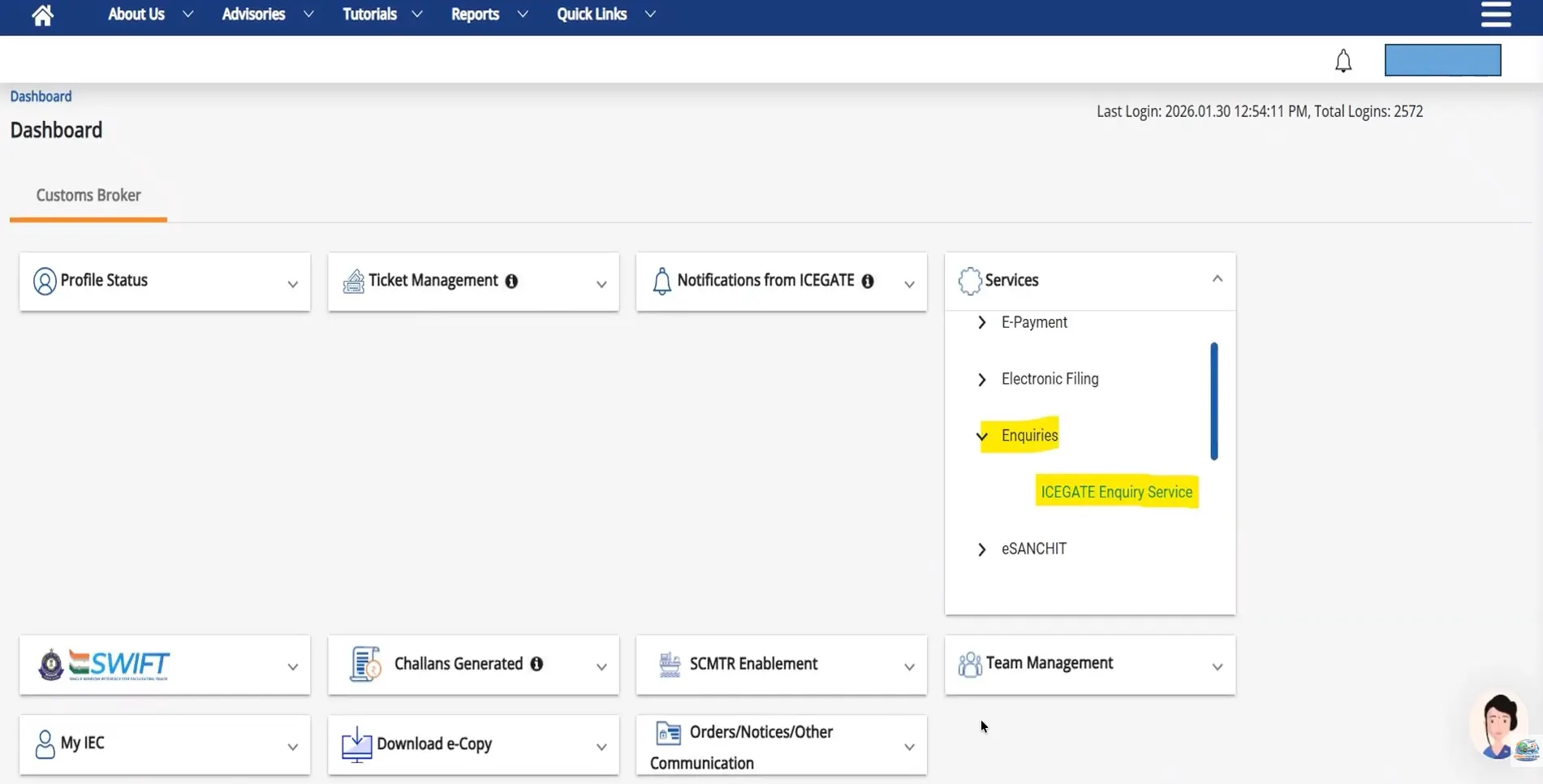
Step 2 — Enquiries → ICEGATE Enquiry Service
Inside Services, click Enquiries. A sub-link appears: ICEGATE Enquiry Service. Click it.
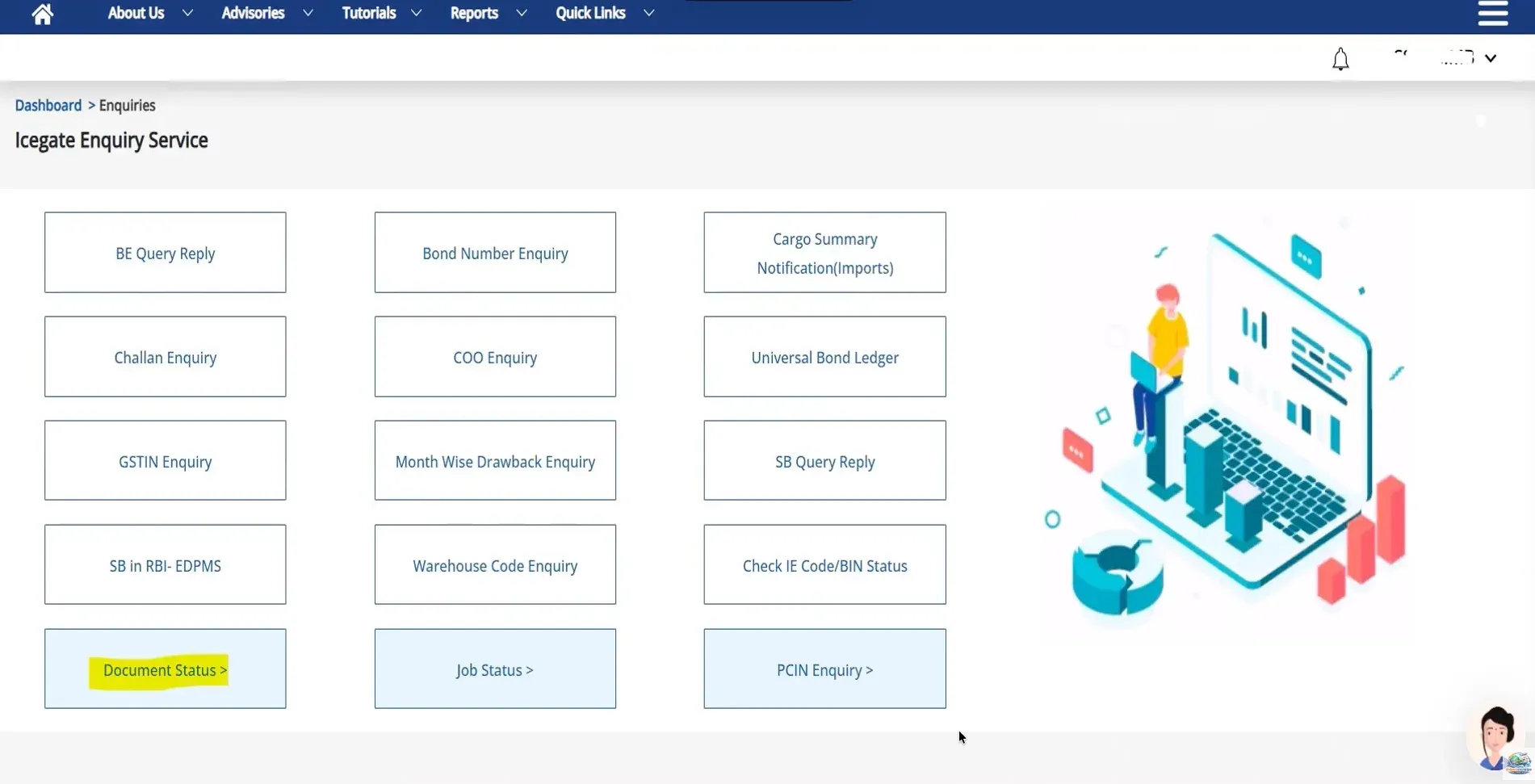
Step 3 — Open Document Status
You'll see a grid of enquiry tiles — BE Query Reply, Challan Enquiry, GSTIN Enquiry, Check IE Code/BIN Status and more. Along the bottom row, click Document Status.
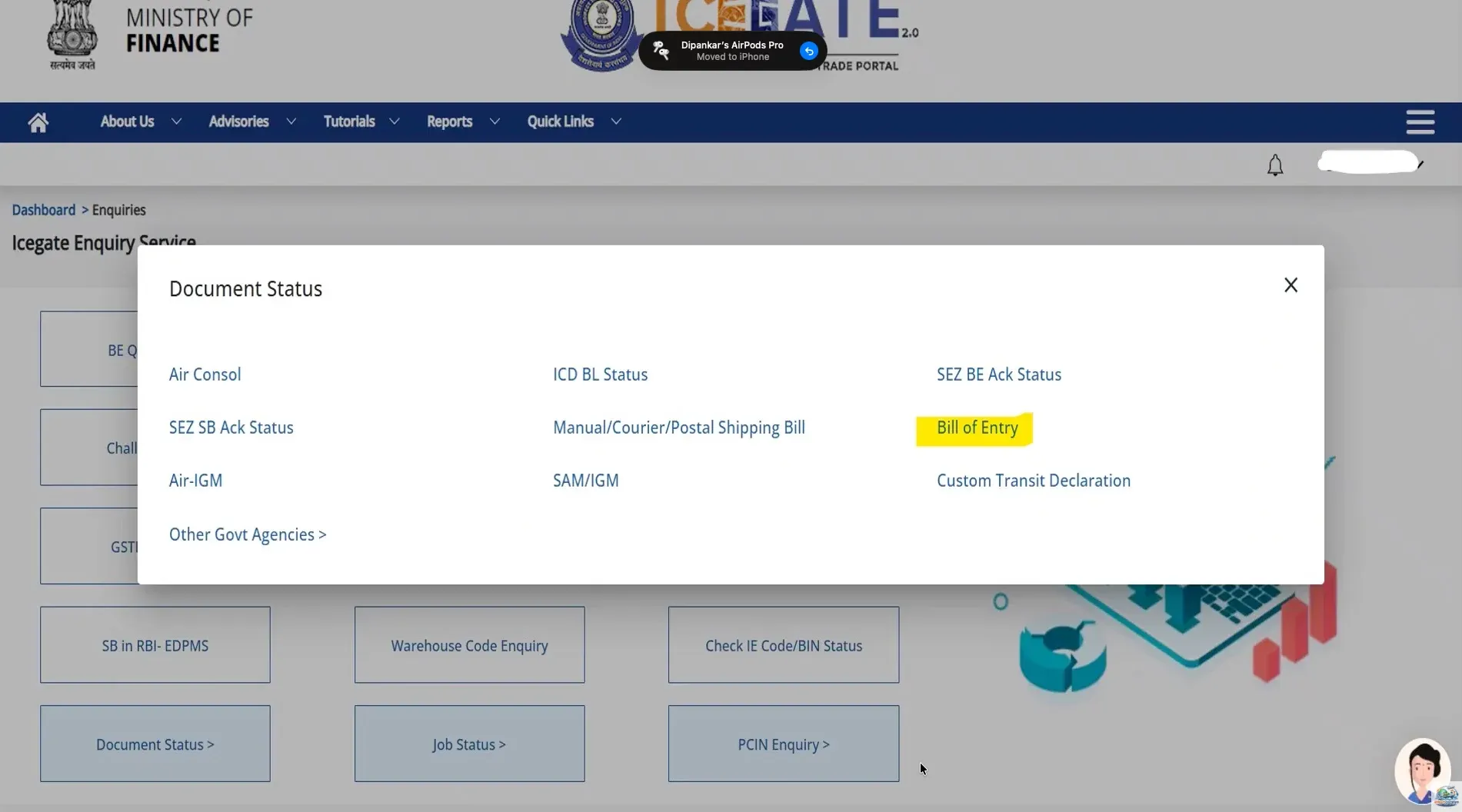
Step 4 — Choose Bill of Entry
A Document Status panel opens listing document types — Air Consol, ICD BL Status, SEZ BE Ack Status, Manual/Courier/Postal Shipping Bill, Air-IGM, SAM/IGM and others. Select Bill of Entry.
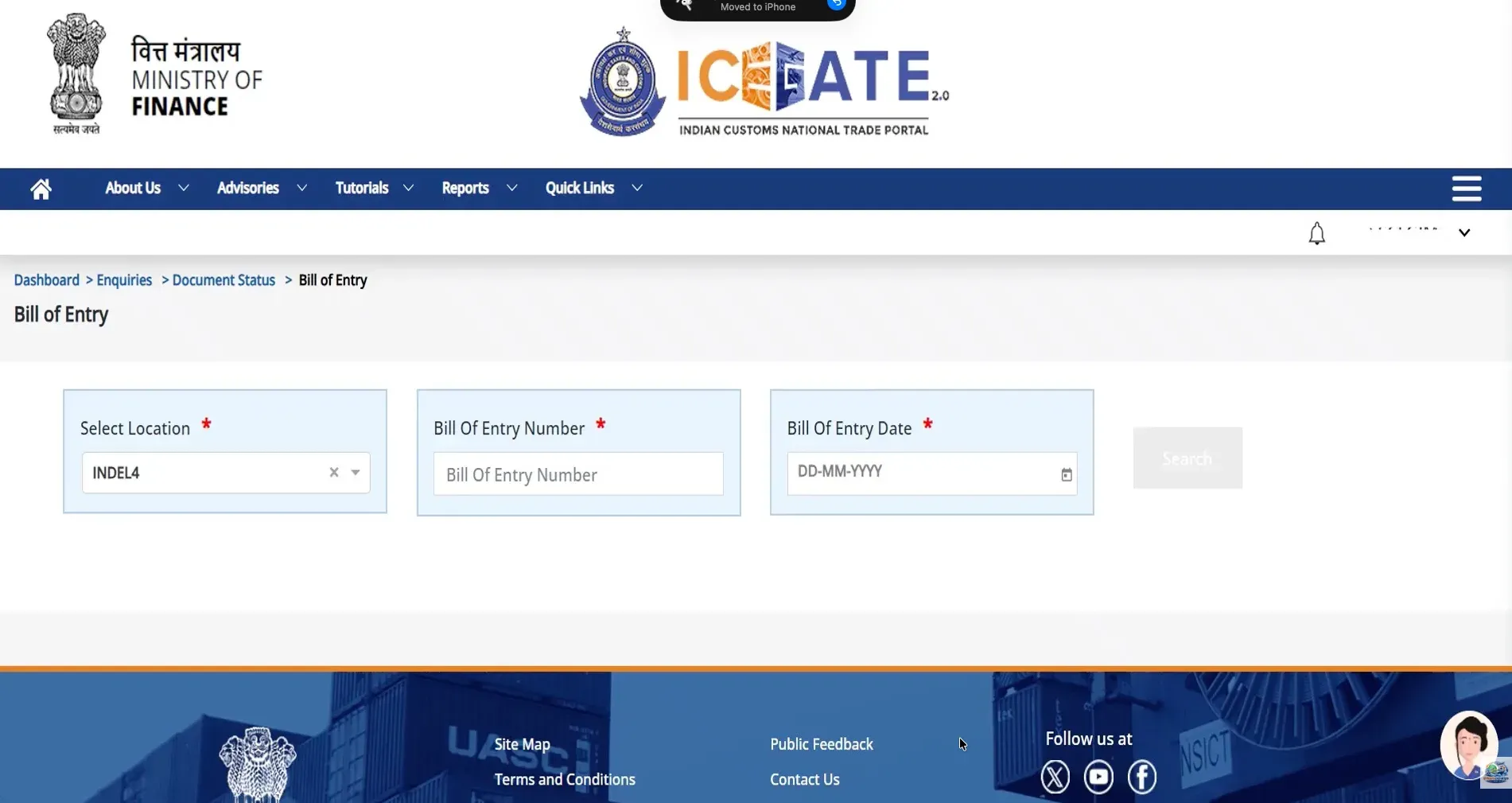
Step 5 — Enter your three details
The search form asks for exactly three things, all mandatory:
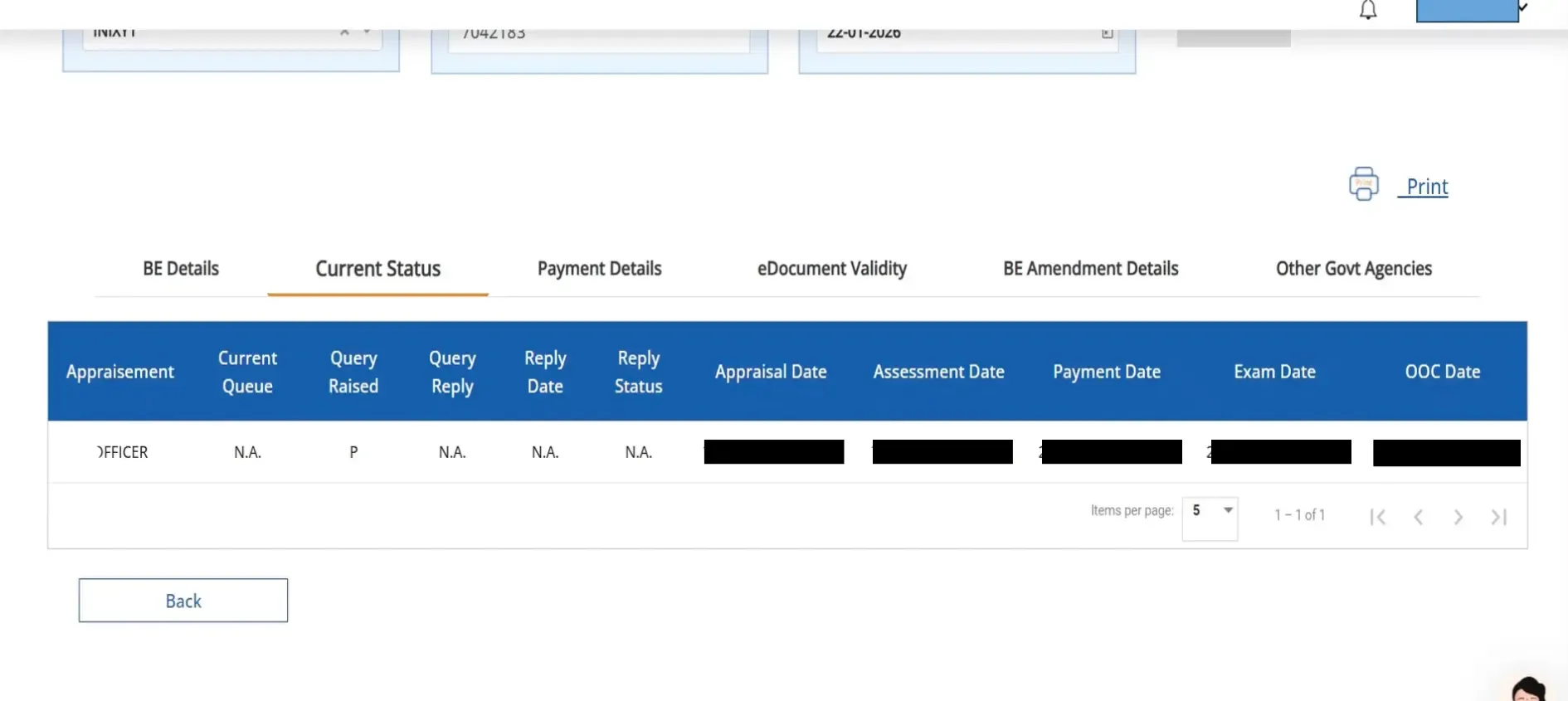
Step 6 — Read the result
Click Search and your BOE opens across six tabs.
The Current Status row, decoded
This is the part no other guide explains, and it's the reason you logged in. The Current Status tab returns a single row with a series of date fields. Read it left to right like a progress bar: the last date that's filled in is where your shipment actually is.
The diagnostic is simple. Find the last populated date, and the next empty one is your blocker. Assessment done but no payment date = pay the duty. Payment done but no OOC and no exam date = you're waiting on examination or a PGA clearance. Query raised with no reply = your CHA owes customs a response, and every day counts against your free days.
After clearance — paying your supplier
Once your BOE shows an OOC date and the cargo moves, the transaction still isn't finished, you have to pay your overseas supplier, and the cost most importers never audit is the FX spread and the bank charges hidden in that transfer.
EximPe handles cross-border payments for Indian importers and exporters at transparent, low-cost FX, with compliant documentation built in, so the money side of your shipment clears as cleanly as the cargo did. Explore EximPe →
Common problems and how to fix them
Key takeaways
- Bill of Entry status is now login-only, via Dashboard → Services → Enquiries → ICEGATE Enquiry Service → Document Status → Bill of Entry.
- You need three inputs: location code, BOE number, BOE date. A wrong port code is the most common reason for a blank result.
- Open the Current Status tab and read the date fields left to right — the last populated date is where you are, the next empty one is your blocker.
- OOC date populated = goods released. Nothing else counts as cleared.
Frequently Asked Questions
Can I check Bill of Entry status without logging in?
No. BOE clearance status now requires a logged-in ICEGATE account via the Enquiry Service. Public routes that once showed it, have been retired.
What details do I need to check BOE status?
Three: the location (port/customs station code), the Bill of Entry number, and the Bill of Entry date. All three must match the filing exactly.
What does "Out of Charge" mean?
Out of Charge (OOC) is customs' formal release of your goods. Once the OOC date is populated, duty is paid, checks are complete, and your cargo can be delivered. It's the only status that means you're done.
My BOE status shows nothing, what's wrong?
Usually the wrong port code, or the BOE hasn't been filed yet. Verify the location code first, then confirm with your CHA that filing actually happened and get the acknowledgement number.
What does "Query Raised" mean and who fixes it?
Customs has asked for clarification on your declaration. Your CHA responds through BE Query Reply on the ICEGATE Enquiry Service. Until they do, assessment is paused, and the delay is on your side, not customs'.
How long does a Bill of Entry take to clear?
A facilitated consignment with clean documents and prompt duty payment can go from assessment to Out of Charge within a day. Queries, examination or PGA clearances extend it, often by several days.
Is the GST portal's "Search BOE" the same thing?
No. That returns BOE records for input tax credit reconciliation. It won't tell you where your consignment is in customs clearance.
Can I check a Shipping Bill the same way?
Yes, the same Document Status menu covers export documents. For the full export-side walkthrough, see our guide on downloading your Shipping Bill from ICEGATE.